TryHair.ai

Shopify wig store growth

Best Shopify apps for wig stores

The best wig store app stack helps shoppers feel confident about style, fit, trust, support, and checkout—without burying your storefront under too many widgets.

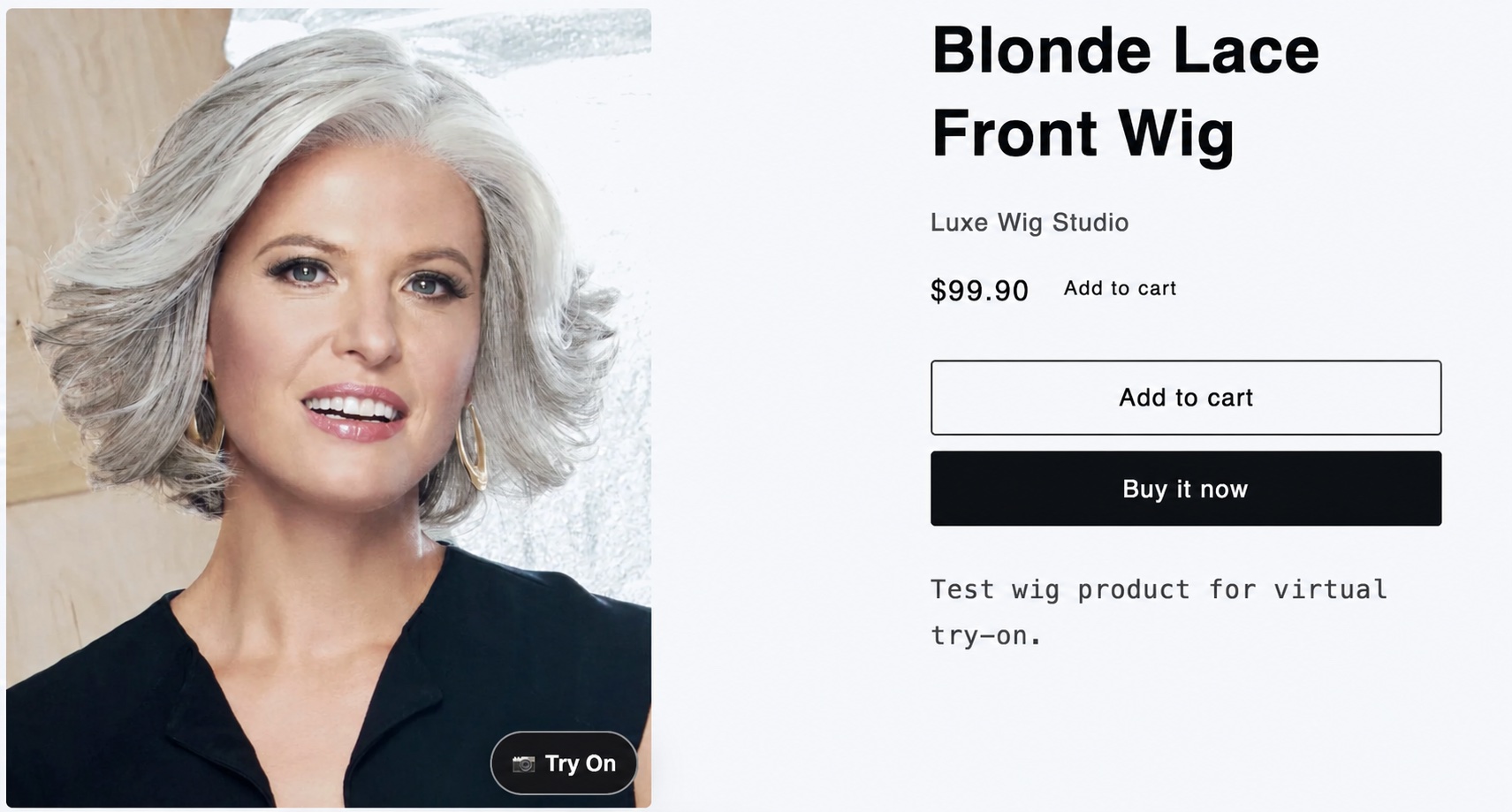
A Shopify wig product page with a Try On button on the product image
For wig stores, the most valuable apps usually remove purchase hesitation.

Wig shoppers are not buying a simple commodity. They are choosing a style that affects identity, confidence, fit, color expectations, and daily wear. That makes the app stack for a Shopify wig store different from a generic fashion store.

A strong Shopify app stack should help shoppers answer practical questions before checkout: Will this style suit me? Is the color close to what I expect? Can I trust the store? What happens if I need help?

The goal is not to install the most apps. The goal is to remove the specific doubts that stop wig shoppers from buying.
Visual confidence
Customer trust
Pre-purchase support
Cart recovery
Measurement

The app categories that matter most

Start with tools that reduce uncertainty on the product page, then add support, retention, and measurement around that core journey.

2

Product reviews and photo reviews

Reviews are especially powerful for wigs. Shoppers want to see real experiences with density, lace quality, color, shedding, cap comfort, and styling. Photo reviews bridge the gap between polished product photography and real customer outcomes.

3

Email and SMS marketing

Many shoppers need time before buying a wig. Email and SMS apps help recover abandoned carts, announce restocks, share care education, and bring shoppers back when they are comparing multiple styles.

4

Live chat or consultation tools

Hair loss customers, first-time wig buyers, and shoppers choosing lace-front or glueless wigs often have detailed questions. Live chat, helpdesk, or consultation booking tools can turn hesitation into a conversation.

5

Upsell and bundle apps

Wig purchases often come with related products: wig caps, glue, adhesive remover, melting bands, brushes, stands, shampoo, conditioner, or styling tools. A careful upsell app can increase average order value without making the product page noisy.

6

Analytics and heatmap tools

Analytics tools help merchants understand where shoppers drop off, which product pages attract attention, and whether new features are being used. This is especially useful when testing try-on, reviews, bundles, or size guidance.

Why virtual try-on deserves a place in the stack

A shopper looking at a lace front bob, a glueless body wave wig, or a highlighted synthetic style is often trying to imagine the result on their own face. If the try-on action is available directly on the product image, the shopper does not need to leave the page or search for a separate tool.

If you are setting up virtual try-on for the first time, read our guide on how to add virtual wig try-on to Shopify. If you specifically want the storefront entry point, see how to add a Try On button to Shopify wig product pages. If return risk is one of your biggest concerns, see how wig stores can reduce returns with virtual try-on.

A wig product image with a Try On button in the lower-right corner
TryHair places the Try On entry point where shoppers are already looking.

A simple starter stack for Shopify wig stores

If you are not sure where to start, build around the main buying objections. This keeps your storefront focused and gives you a clearer way to measure what helps.

ConfidenceVirtual wig try-on and product photo guidance.
TrustReviews, photo reviews, and clear policies.
SupportLive chat, helpdesk, or consultation booking.
RetentionAbandoned cart, restock, and education flows.
MeasurementAnalytics for product page behavior.

How to choose apps without slowing down your store

Every app adds operational complexity. Some apps also add storefront scripts, widgets, popups, or tracking. Before installing another tool, ask what shopper problem it solves and where it appears in the buying journey.

  • Use virtual try-on to reduce visual uncertainty on product pages.
  • Use reviews to build trust and show real customer experiences.
  • Use email or SMS to recover shoppers who need more time.
  • Use chat or consultation tools for high-consideration purchases.
  • Use analytics to measure what shoppers actually do.

For a new wig store, a focused stack is usually better than a crowded one. Start with the tools that directly support confidence and conversion, then add more only when you can clearly measure the need.

FAQ

What Shopify apps are most useful for wig stores?

The most useful categories are virtual try-on, product reviews, email or SMS marketing, live chat or consultation tools, upsells, and analytics.

Do wig stores need a virtual try-on app?

Not every store needs one on day one, but virtual try-on is highly relevant for wig stores because shoppers often want to understand style, length, and face-framing before buying online.

Should a wig store install many Shopify apps at once?

No. A smaller, focused stack is usually safer. Install apps that solve clear shopper problems, then measure whether they improve engagement, conversion, or support workload.

Can TryHair be used only on selected products?

Yes. TryHair lets merchants enable Try On for selected wig products, which is helpful when some product images are more suitable for virtual try-on than others.

Add virtual wig try-on to your Shopify product pages

TryHair - Wig Try-On adds a Try On button to selected Shopify product images, allowing shoppers to upload a photo and preview a wig before purchasing. Setup takes about one minute, with no theme coding required.